Best Free Browser Chess Analysis Boards That Don’t Require a Login
Want to check a chess position quickly without creating an account, installing software, or fighting through clutter? This guide explains the best no-login chess analysis board workflow and how to use a browser-based engine for fast, private position checks.
 Alex Torres
The best free browser chess analysis board without login is one that lets you paste a FEN, set up a custom position, run engine analysis, view multiple candidate lines, and copy the result without creating an account. The ideal workflow should feel immediate, clean, and distraction-free so players can focus entirely on the position itself rather than navigating menus or account prompts.
Why Players Want No-Login Chess Analysis
Most chess players do not always need a full training platform. Sometimes you only want one thing: paste a position, check the best move, compare a few engine lines, and move on. A no-login chess analysis board removes the friction between the question and the answer.
This matters most when you are reviewing a single critical moment from a blitz game, checking a puzzle position, helping a student during coaching, or analyzing a board screenshot that someone shared in a chat. For these tasks, account creation, daily limits, popups, and heavy interfaces slow down the workflow.
A lightweight browser-based chess analyzer is different. It opens immediately, runs inside the browser, accepts FEN positions, and gives you the engine result without asking for a profile. That is the core use case ChessAlgo is designed around.
Use a no-login chess analysis board when you need a quick position check, not a full training dashboard. If you already have a FEN string, the fastest path is to paste it into the ChessAlgo Chess Move Calculator and run the engine immediately.
Best Free Browser Chess Analysis Boards
There are several ways to analyze chess positions online. Some are full chess platforms, some are database tools, and some are focused calculators. The best choice depends on whether you want speed, privacy, account-free access, or a deeper game-review environment.
ChessAlgo
Best for speedFocused on fast custom-position analysis with a clean browser workflow, simple FEN support, and quick engine access for players who want immediate position checks.
Lichess Analysis Board
Best free platformPowerful free analysis board with Stockfish, studies, game import, and strong community tools. Best when you want a complete open-source chess platform.
Chess.com Analysis
Best ecosystemStrong for reviewing games played on Chess.com, but users may run into account-based features, game-review limits, or heavier interface flows.
Desktop Engines
Best depthTools like Arena, SCID, or local Stockfish setups can be powerful, but they require installation and are not ideal for quick browser checks.
For quick study sessions, the cleanest workflow is simple: copy a FEN, paste it into a browser board, run the engine, and compare the top candidate moves.
No-Login Analysis Board Comparison
The best free chess analysis board is not always the one with the most features. For quick position checks, speed and friction matter more than a large dashboard. Here is the practical comparison.
| Feature | ChessAlgo | Lichess | Chess.com | Desktop Engine |
|---|---|---|---|---|
| No account needed | Yes | Yes for analysis | Limited/varies | Yes |
| Browser-based | Yes | Yes | Yes | No |
| Fast custom position check | Excellent | Strong | Good | Powerful but slower setup |
| FEN input | Direct | Direct | Available | Available |
| Best for beginners | Very simple | Many options | Game-review focused | Technical |
| Best use case | Instant best move checks | Full free chess platform | Reviewing Chess.com games | Deep local analysis |
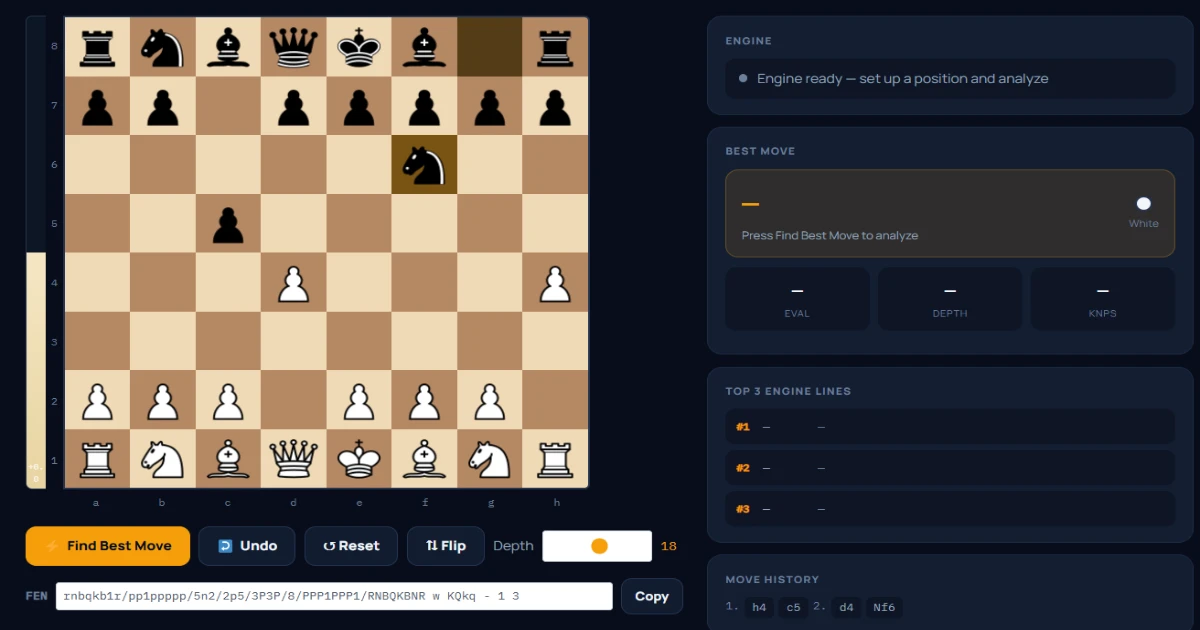
For a fast, account-free position check, use ChessAlgo. For creating studies and saving longer analysis files, Lichess is excellent. For reviewing games played on Chess.com, Chess.com Game Review is convenient. For maximum local control, use a desktop engine.
Fast ChessAlgo Workflow: Analyze Without Login
Here is the exact workflow for using ChessAlgo as a free browser chess analysis board. It works best when you already have a FEN string, but you can also set up the position manually on the board.
Open the ChessAlgo calculator
Go to the ChessAlgo Chess Move Calculator. The board loads directly in your browser, so you can start without signing in.
Paste your FEN or set up the board
If you copied a FEN from Chess.com, Lichess, a puzzle, or a PGN viewer, paste it into the FEN input. If not, move pieces on the board until the position matches your game.
Choose your depth
Use lower depth for quick checks and higher depth for critical positions. For most club-level game reviews, depth 18–22 is enough to understand the main tactical and positional idea.
Click Find Best Move
Read the top move, evaluation, and engine lines. Do not only copy the first move — compare the candidate lines to understand why the best move is better.
Analyze Any Position Without Login
Paste your FEN into ChessAlgo and get a clean browser-based engine analysis with no account, no clutter, and no unnecessary setup.
Features That Matter in a Free Chess Analysis Board
Not every free analysis board is equal. Some tools are excellent for full study creation, while others are better for quick move calculation. Before choosing a tool, check these features.
FEN Support
EssentialA serious analysis board must accept FEN so you can load exact positions without replaying the whole game.
Multiple Engine Lines
ImportantOne line tells you the best move. Multiple lines show whether alternatives are close or clearly inferior.
Fast Load Time
PracticalA browser tool should load quickly, especially on mobile or old laptops where heavy dashboards feel slow.
Copyable Output
UsefulAfter analyzing, you should be able to copy the new FEN or share the position with a friend, coach, or student.
Privacy Benefits of Account-Free Chess Analysis
Account-free chess analysis is not only about speed. It also gives you a simpler privacy model. You do not need to attach every position to a username, game history, or public study unless you choose to share it.
This is useful for coaches, students, streamers, and players testing opening prep. A private browser workflow lets you check a position quickly and close the tab when finished. No profile, no saved public study, no unnecessary data trail.
For lessons, keep a separate tab open with ChessAlgo. When a student asks “what should I play here?”, paste the position, run the engine, and use the top three lines to explain candidate moves instead of simply giving one answer.
Common Mistakes When Using Free Analysis Boards
Free browser tools are powerful, but beginners often use them incorrectly. Avoid these mistakes to get better analysis instead of just more engine numbers.
Using the wrong side to move
FEN issueIf the FEN says White to move when it is actually Black to move, the engine answer will be for the wrong player.
Stopping at low depth
Accuracy issueDepth 8–12 may miss tactics. For serious review, use a higher depth and compare lines.
Only reading the best move
Learning issueThe best move matters, but the second and third lines explain why other natural moves fail.
Ignoring human plans
Study issueEngines calculate tactics perfectly, but you still need to understand the positional idea behind the recommendation.
Related ChessAlgo Guides
Frequently Asked Questions
Why Fast Browser Analysis Matters More Than Ever in 2026
Modern online chess platforms are packed with features. That sounds useful in theory, but in practice many players only need a fast answer to a single question: “What is the best move in this position?”
That is why lightweight browser chess analysis tools are becoming more popular. Players no longer want to open five menus, wait for cloud syncing, close subscription prompts, or navigate a heavy dashboard just to check one tactical idea from a blitz game.
The modern chess workflow is different now. A player might see a puzzle on social media, copy a FEN from a Discord server, pause a YouTube lesson, or receive a position from a student on WhatsApp. In all of these situations, speed matters more than advanced ecosystem features.
This is where browser-based analysis boards dominate. They remove friction. Open tab → paste position → analyze move → close tab. That workflow is far more efficient for everyday chess study than a full platform login cycle.
Another important shift is mobile analysis. More than half of casual online chess users now review positions directly from their phones. Heavy interfaces that perform constant background loading can feel slow on mid-range devices, especially during deeper Stockfish calculations. Lightweight browser tools solve that problem by focusing on the actual analysis workflow instead of feature overload.
For club players, coaches, students, and content creators, this simplicity becomes a real competitive advantage. The faster you can check an idea, the more likely you are to build a consistent analysis habit.
Many players are not leaving major chess platforms because the engines are weak. They are leaving because the workflow feels slow for quick analysis. Fast access is now just as important as engine strength.
What Makes a Great No-Login Chess Tool?
Most players assume all chess engines are basically identical because many platforms use Stockfish. That is partly true. The engine may be similar, but the user experience around the engine is completely different.
A strong no-login chess analysis board focuses on efficiency. It should help the player move from question to answer with as little resistance as possible.
1. Instant Access
The best tools open immediately in the browser. No app download, no account creation, no forced onboarding screens. A player should be able to open the tab and begin analyzing within seconds.
2. Clean Position Setup
Position setup is one of the most underrated features in chess software. A clean board editor with drag-and-drop piece placement saves time and reduces mistakes. FEN import should also work instantly without confusing formatting issues.
3. Reliable Engine Output
Players do not only want the top move. They want confidence that the engine is evaluating the position correctly. Stable evaluation bars, multiple candidate lines, and accurate move ordering matter much more than flashy graphics.
4. Mobile Friendliness
Many chess players analyze on mobile after games. A good analysis board should remain smooth on smaller screens and weaker devices without overheating the phone or freezing the browser tab.
5. Easy Sharing
Sharing positions with a coach or friend should take one click. Modern chess workflows depend heavily on FEN sharing, copied links, and browser-based collaboration.
Why FEN Support Is So Important
FEN stands for Forsyth–Edwards Notation. It is the standard way to represent an exact chess position using text. Instead of replaying every move from the start of the game, a player can instantly recreate the current board using a single line of notation.
For example, if you are reviewing a tactic from move 28 of a rapid game, you do not want to replay 27 previous moves every time you switch tools. A FEN string solves that instantly.
This is why strong FEN support is essential for modern browser analysis boards. The workflow becomes dramatically faster:
Copy the FEN
Export the position from Chess.com, Lichess, a PGN viewer, or a coaching database.
Paste into ChessAlgo
The position loads instantly without replaying the entire game.
Analyze the position
Run the engine, compare lines, and study the tactical or positional ideas immediately.
Without FEN support, online analysis becomes much slower and less practical for serious improvement.
Browser Analysis vs Desktop Chess Engines
Desktop engines still matter for deep analysis. Strong tournament players often use powerful local Stockfish setups running for hours on high-end hardware. But most everyday players do not need that level of calculation.
For practical improvement, browser tools are often more useful because they reduce setup time dramatically.
| Workflow | Browser Analysis | Desktop Engine |
|---|---|---|
| Setup Speed | Instant | Requires installation |
| Mobile Use | Excellent | Poor |
| Deep Overnight Analysis | Limited | Excellent |
| Quick Position Checks | Excellent | Good but slower workflow |
| Ease for Beginners | Very easy | Technical setup required |
| Best For | Everyday analysis | Advanced engine research |
For 95% of practical chess situations, browser analysis is more than enough. Most club players gain more from consistent fast review than from ultra-deep overnight engine calculations.
How Coaches and Students Use No-Login Analysis Boards
Coaches increasingly use lightweight browser tools during live lessons because they reduce distractions. Instead of switching between databases, cloud studies, and account dashboards, a coach can focus directly on the position.
A typical workflow looks like this:
Student Sends Position
Step 1The student shares a screenshot or FEN from a recent game.
Coach Loads Position
Step 2The coach pastes the FEN into a browser tool like ChessAlgo.
Engine Compares Moves
Step 3The coach explains the top candidate lines instead of only one engine move.
Student Understands Plans
Step 4The focus remains on understanding ideas, not memorizing engine numbers.
This style of coaching is becoming more popular because it feels faster, cleaner, and more interactive than traditional desktop workflows.
When a Full Chess Platform Makes More Sense
A lightweight browser calculator is perfect for fast position checks, tactics, coaching moments, and quick game review. But there are situations where a full chess platform or desktop engine is the better choice.
If you need large PGN databases, cloud study storage, tournament preparation files, or extremely deep overnight engine analysis, tools like ChessBase, Arena, or long-form Lichess studies may fit your workflow better.
That distinction actually matters. The strongest chess workflow is not about using one tool for everything. It is about using the right tool for the right task.
For example:
Quick Tactical Check
Use ChessAlgoPerfect for checking one position, finding the best move, or comparing candidate lines quickly.
Long Opening Prep
Use Database ToolsBetter for storing massive repertoires, annotated games, and long preparation files.
Mobile Study Sessions
Use Browser ToolsFast browser-based analysis is usually smoother and simpler on phones and tablets.
Deep Overnight Engine Runs
Use Desktop EnginesLocal engines on powerful hardware remain best for extremely deep calculations.
This balanced approach makes analysis more practical and prevents players from overcomplicating simple review sessions.
Example: Using a Real Tactical Position
Imagine you are reviewing a rapid game and reach a critical middlegame moment where White appears to have an attack on the kingside. Instead of replaying the entire game, you copy the FEN and paste it directly into ChessAlgo.
After running the engine to depth 20, the top candidate lines might look something like this:
| Engine Line | Evaluation | Idea |
|---|---|---|
| 1. Nf5! | +2.3 | Creates pressure on the king and threatens discovered tactics on g7. |
| 1. Qh5 | +1.4 | Looks aggressive but allows defensive exchanges. |
| 1. Re1 | +0.8 | Solid positional move but too slow for the attack. |
This is where browser analysis becomes genuinely useful. Instead of only receiving one engine move, the player can compare ideas, understand tactical differences, and learn why certain attacking plans succeed while others fail.
That learning process is far more valuable than blindly copying the top Stockfish recommendation.