FEN Chess Notation Explained:
The Complete 2026 Guide
Everything you need to know about Forsyth–Edwards Notation — what it is, how to read it, how to write it, and how to use it with free analysis tools. Written by a FIDE-rated analyst with 15 years of competitive chess experience.
 Alex Torres
FEN (Forsyth–Edwards Notation) is a standard text format that describes any chess position on a single line. A FEN string encodes six pieces of information: the position of every piece on the board, which side is to move, castling rights, any en passant target square, the number of moves since the last pawn advance or capture, and the current move number. Every major chess engine and platform uses FEN.
- What Is FEN in Chess?
- The 6 Fields of a FEN String — Decoded
- How to Read Any FEN String in 3 Steps
- How to Write a FEN String
- Real FEN Examples — Starting Position to Complex Endgame
- Where FEN Is Used in Chess Software
- FEN vs PGN — Key Differences
- Using FEN with ChessAlgo’s Free Calculator
- 5 Common FEN Mistakes and How to Fix Them
- Frequently Asked Questions
What Is FEN in Chess?
FEN stands for Forsyth–Edwards Notation. It is a standardised text format invented by Scottish newspaper journalist David Forsyth in the 1880s and later extended by Steven Edwards in the 1990s to include additional game state information. The resulting standard — the one used by every chess program in the world today — was incorporated into the PGN (Portable Game Notation) specification in 1994.
The purpose of a FEN string is simple but powerful: to describe a complete chess position on a single line of plain text in a way that any chess program can read, interpret, and reproduce exactly. Where a photograph captures a board position visually, FEN captures it as data — machine-readable, transferable, and completely unambiguous.
Consider the starting position of a chess game. In FEN, it is written as:
That single line completely describes the board state — which piece is on which square, whose turn it is, whether either player can castle, and the state of the fifty-move rule. Give that string to any chess engine — Stockfish, Leela Chess Zero, or the free ChessAlgo calculator — and it will reproduce the exact position instantly.
FEN is the universal language of chess software. Understanding it means you can move positions freely between Chess.com, Lichess, ChessBase, and any analysis engine. It means you can share a specific position from your game for analysis without sharing the full game record. And it means you can understand exactly what chess engines are doing when they report positions.
The 6 Fields of a FEN String — Decoded
A FEN string consists of exactly six fields separated by single spaces. Each field encodes a specific aspect of the position. Understanding all six is the foundation of reading and writing FEN correctly.
Piece Placement rnbqkbnr/pppppppp/8/8/8/8/PPPPPPPP/RNBQKBNR
The first field is the most complex. It describes every square on the board, reading from rank 8 (Black’s back rank) to rank 1 (White’s back rank), and from file a to file h within each rank. Ranks are separated by forward slashes.
Each piece is represented by a letter. Uppercase letters are White pieces, lowercase letters are Black pieces: K/k = King, Q/q = Queen, R/r = Rook, B/b = Bishop, N/n = Knight, P/p = Pawn. Numbers represent consecutive empty squares — the digit 8 means the entire rank is empty, 3 means three consecutive empty squares, and so on.
Example: rnbqkbnr means Black’s starting rank 8: rook, knight, bishop, queen, king, bishop, knight, rook. 8 means eight consecutive empty squares (a complete empty rank).
Active Color w or b
The second field is a single character indicating whose turn it is to move. w means it is White’s turn. b means it is Black’s turn.
After 1.e4, the FEN changes the active color field from w to b because it is now Black’s turn to respond. This single character is critical — load a FEN with the wrong active color and the engine will calculate moves for the wrong side.
Castling Availability KQkq
The third field encodes which castling moves are still legally available. Each letter represents one castling right: K = White can castle kingside, Q = White can castle queenside, k = Black can castle kingside, q = Black can castle queenside.
KQkq means all four castling options remain available. Kq means White can only castle kingside and Black can only castle queenside. – means neither player can castle in any direction — this appears in any position where kings or rooks have already moved.
En Passant Target Square e3 or –
The fourth field records the en passant target square, if any. En passant is only possible on the move immediately following a two-square pawn advance. After 1.e4, the FEN records e3 — the square the White pawn passed through — because Black could capture en passant on e3 with a pawn on d4 or f4.
If no en passant capture is possible (which is the case in the vast majority of positions), this field is simply a hyphen: –. The en passant square is only recorded for one move — if Black does not capture en passant immediately, the right expires and the field returns to –.
Halfmove Clock 0
The fifth field is the halfmove clock — the number of half-moves (plies) since the last pawn move or capture. This field is used to enforce the fifty-move draw rule. If this number reaches 100 (fifty full moves), either player can claim a draw.
A halfmove clock of 0 means a pawn was just moved or a capture just occurred on the previous half-move. In the starting position, the value is 0. After 1.e4 e5 2.Nf3, the value becomes 1 because the knight move was not a pawn move or capture. After the next pawn move, it resets to 0 again.
Fullmove Number 1
The sixth and final field is the fullmove number — the count of complete moves in the game. It starts at 1 for the starting position and increments by 1 after each of Black’s moves (because a complete move consists of both White and Black playing once).
After 1.e4, the fullmove number is still 1 (White has moved, but the move is not complete until Black responds). After 1.e4 e5, the number becomes 2. After 1.e4 e5 2.Nf3, it is still 2. After 1.e4 e5 2.Nf3 Nc6, it becomes 3.
How to Read Any FEN String in 3 Steps
Reading an unfamiliar FEN string looks daunting when you first see it. Within a few minutes of practice, it becomes completely natural. Here is the three-step process I teach every student who wants to use engine analysis tools effectively.
Split the string into its six space-separated fields
The spaces between fields are your navigation markers. Every FEN string has exactly five spaces — the boundaries between six fields. As a beginner, write out the six fields separately so you can process each one independently. For the starting position FEN rnbqkbnr/pppppppp/8/8/8/8/PPPPPPPP/RNBQKBNR w KQkq – 0 1, your six fields are: piece placement, w, KQkq, –, 0, 1.
Decode the piece placement field rank by rank
Split the first field at the forward slashes to get eight rank strings, reading from rank 8 (top) to rank 1 (bottom). For each rank, read left to right — letters represent pieces (uppercase = White, lowercase = Black), numbers represent that many consecutive empty squares. Verify by counting that each rank totals exactly 8 squares. If your total is not 8, you have a malformed FEN.
Example: r1bqk2r = rook, 1 empty, bishop, queen, king, 2 empty, rook = 8 squares ✓
Read the remaining five fields as simple metadata
Fields 2–6 are straightforward. Check active color (w or b), note which castling rights remain, check whether en passant is available, and read the clock numbers. In practice, you will use these fields primarily to verify that the FEN you paste into an engine reflects the correct game state — particularly castling rights, which are the most common source of FEN errors when reconstructing positions manually.
“Learning to read FEN takes about fifteen minutes. Using it properly to study your games — moving positions instantly between engines, databases, and analysis tools — saves you hours. It is the single most practical notation skill any chess player can acquire.”
Alex Torres — Chess Analyst & Founder, ChessAlgo.comHow to Write a FEN String
Writing FEN from a physical board or diagram is a skill that matters when you want to set up custom positions for analysis, create puzzles, or share positions from over-the-board games that were not recorded digitally. The process is methodical and takes under two minutes once you know the structure.
Step 1: Encode the piece placement. Starting from rank 8, scan each rank left to right (a through h). Write the letter for each piece (uppercase for White, lowercase for Black). Count consecutive empty squares and write the number. Add a forward slash after each rank except the last. Verify every rank totals 8.
Step 2: Add the active color. If it is White’s turn, write a space then w. If Black’s turn, write a space then b. This is the most common error — always check the active color carefully when encoding a position from the middle of a recorded game.
Step 3: Encode castling rights. Has the White king moved? Has the a1 rook moved? Has the h1 rook moved? Same questions for Black. Write the available castling letters (K, Q, k, q) in that order. If none are available, write –.
Step 4: Record the en passant square. Was the last move a two-square pawn advance? If yes, write the square the pawn passed through. If not (the overwhelming majority of cases), write –.
Step 5: Write the halfmove clock. How many half-moves have occurred since the last pawn move or capture? If you do not know precisely, write 0 — this is acceptable for analysis purposes since engines use the halfmove clock only for fifty-move rule detection.
Step 6: Write the fullmove number. Which move number is this? If uncertain, write the best estimate or 1. For pure analysis purposes, the move number rarely affects engine output.
After writing a FEN string, count the pieces encoded. A complete game should have 2 kings, at most 8 pawns per side, and piece counts consistent with legal chess — no player can have more than 9 queens, 10 rooks, 10 bishops, or 10 knights. If your piece counts are impossible, your FEN has an encoding error. Paste it into the ChessAlgo calculator — it will reject invalid FEN strings with an error message.
Real FEN Examples — Starting Position to Complex Middlegame
The fastest way to internalise FEN is to study real examples with the position visible alongside the string. Here are four positions with full FEN decoding.
Notice in Example 2 how each move traces through the FEN fields: the piece placement field changed to reflect four piece movements, the active color flipped to b, the castling rights remain KQkq because no king or rook has moved, en passant is – because the last move was Bb5 (not a pawn advance), the halfmove clock is 3 (three half-moves since the pawn exchanges on moves 1–2), and the fullmove number is 3.
Where FEN Is Used in Chess Software
FEN is not just an academic notation system — it is the universal data format that powers the modern chess ecosystem. Understanding where FEN appears tells you exactly when you need to use it.
Chess Engines and Analysis Tools
Every chess engine communicates via the UCI (Universal Chess Interface) protocol, which uses FEN as the primary method of specifying board positions. When you click “Analyse from here” in Lichess, the site packages the current position as a FEN string and sends it to Stockfish. When you paste a FEN into the ChessAlgo chess move calculator, the engine loads that exact position and evaluates it using Stockfish 17 at your chosen depth.
Without FEN, you would have to replay every move of a game from the beginning every time you wanted to analyze a specific position. FEN lets you jump directly to any moment in any game in a fraction of a second.
Chess Platforms — Chess.com, Lichess, ChessBase
Chess.com and Lichess both allow FEN import in their analysis boards. On Chess.com, click “Analysis” → “Setup Position” → paste FEN. On Lichess, use the analysis board URL parameter: lichess.org/analysis/[FEN]. ChessBase uses FEN as its primary position import format for both game databases and position searches across millions of archived games.
Problem Composition and Puzzle Databases
Every published chess puzzle — whether in a database like Lichess Puzzles (which contains over 3 million positions) or in a chess training app — is stored as a FEN string. When you solve a puzzle on any platform, the starting position was encoded as FEN. This is why learning FEN makes you a more effective puzzle studier: you can export any puzzle position, load it into a full-depth engine for deep analysis, and understand the underlying tactics at a level no puzzle interface can provide.
Imagine you lost a game with an unusual tactic you did not understand. Copy the FEN of the critical position from your Chess.com game review. Paste it into ChessAlgo’s free Stockfish calculator. Set depth to 22. The engine shows you the three best continuations, the centipawn evaluation, and the complete principal variation — far more detail than Chess.com’s standard game review provides. This workflow is how strong players use FEN every day.
FEN vs PGN — Key Differences
FEN and PGN (Portable Game Notation) are complementary formats that serve different purposes. Confusion between them is common among players who are new to chess notation standards.
| Feature | FEN | PGN |
|---|---|---|
| What it encodes | A single position | A complete game with all moves |
| Format | One line of text | Multi-line structured text file |
| Encodes move history | No | Yes |
| Encodes game metadata | No (no players, date, event) | Yes (full metadata headers) |
| Best used for | Position analysis, puzzle sharing, engine input | Full game recording, database storage |
| Can represent mid-game position | Yes — directly | Yes — but requires replaying all moves |
| Castling rights tracked | Yes (field 3) | Implicit (derived from move history) |
| En passant tracked | Yes (field 4) | Implicit (derived from move history) |
| Fifty-move rule tracked | Yes (field 5) | Implicit |
| Engine input format | Primary (UCI uses FEN) | Not directly (must be converted) |
The practical rule: use FEN when you want to share or analyze a specific position; use PGN when you want to record or share a complete game. In practice, most serious analysis workflows use both — PGN to store the complete game history, FEN to extract specific positions for deep engine analysis. ChessAlgo’s chess move calculator accepts FEN input directly, making it straightforward to jump from any PGN viewer into full Stockfish analysis.
Using FEN with ChessAlgo’s Free Calculator
The most practical application of FEN for most players is using it to load positions into an analysis engine. ChessAlgo’s free Stockfish calculator makes this one of the fastest workflows available anywhere — no account, no daily limits, depth up to 25, completely free.
Copy the FEN from your chess platform
On Chess.com: open your game in analysis mode, navigate to the position you want, click the FEN icon below the board, copy the string. On Lichess: open the game in analysis, go to the position, click “FEN & PGN” below the board. On ChessBase: right-click any position in the game viewer → Copy FEN. The FEN string for any position is always accessible from the current board state.
Paste into the ChessAlgo FEN bar
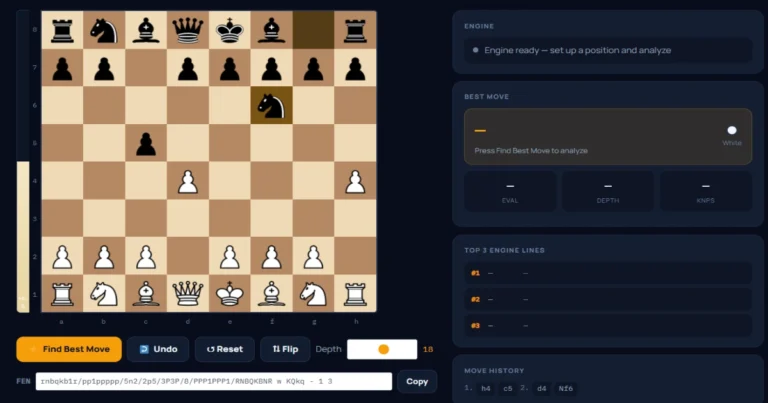
Go to ChessAlgo.com/chess-move-calculator. Below the board, you will see the FEN input bar. Paste your copied string and press Enter or click away from the field. The board updates instantly to show the exact position. The active color indicator in the analysis panel updates automatically — you can see immediately whose turn it is.
Set depth and click Find Best Move
Use the depth slider to set your analysis depth. For most middlegame positions, depth 20 gives accurate grandmaster-level results in under five seconds. For critical endgame positions or deep tactical puzzles, push to depth 22–25. Click Find Best Move and read all three engine lines — not just the top move. The three-line output tells you both the best move and how much worse the alternatives are, which is crucial for understanding why a specific move is objectively best.
Copy the output FEN to continue analysis
After each best move is displayed, the board updates to show the new position. Use the Copy FEN button to capture that position’s FEN string. This lets you chain positions — analyze the best move, copy the resulting FEN, analyze the opponent’s best response, and so on — building a complete engine-verified game tree from any starting position you choose.
Paste Any FEN — Get Instant Analysis
Free Stockfish engine at depth 25. Three engine lines. Evaluation bar. Win probability. No account. No limits. No install.
5 Common FEN Mistakes and How to Fix Them
- FEN (Forsyth–Edwards Notation) encodes any chess position as a single line of text using six space-separated fields: piece placement, active color, castling rights, en passant, halfmove clock, and fullmove number.
- Piece placement reads from rank 8 to rank 1, left to right. Uppercase letters are White pieces, lowercase are Black. Numbers represent consecutive empty squares. Each rank must total exactly 8.
- The castling rights field is the most error-prone when writing FEN manually — a right is permanently lost the moment the relevant king or rook first moves, regardless of their current position.
- FEN encodes a single position; PGN encodes a complete game with move history and metadata. Use FEN for engine analysis and position sharing; use PGN for game records.
- Every major chess engine, platform (Chess.com, Lichess, ChessBase), and puzzle database uses FEN as its primary position data format. It is the universal language of chess software.
- To use FEN for analysis: copy from your platform, paste into the FEN bar on the ChessAlgo calculator, set depth to 20+, and click Find Best Move. No account needed, no limits.
Frequently Asked Questions
Conclusion
FEN is the lingua franca of modern chess software — compact, unambiguous, and universally supported. Once you can read a FEN string in under thirty seconds and write one in under two minutes, you gain full access to the most powerful analysis workflows available to any player: loading any position from any game into any engine, sharing exact positions with coaches and training partners, and building analysis chains from critical moments in your own games.
The ChessAlgo chess analysis platform is built around FEN. Every tool — from the free chess move calculator to the complete game analysis workflow — accepts FEN as the primary position input, making it straightforward to go from a game on Chess.com or Lichess to full Stockfish analysis at depth 25 in a matter of seconds. No account. No limits. No install required.
Continue Learning